Saturday, April 25, 2015

Using Python's PIL library to remove "green screen" background.


For some of the sprite sheets used in the game, the renders use a solid background color; these need to be removed to show only the object that was meant to be rendered. An easy way to do this is using Python's image editing library, PIL. Check out the source below.

 from PIL import Image  
 from PIL import ImageFilter  
 import os  
 for filename in os.listdir("."): # parse through file list in the current directory  
      if filename[-3:] == "png":  
           img = Image.open(filename)  
           img = img.convert("RGBA")  
           pixdata = img.load()  
           for y in xrange(img.size[1]):  
                for x in xrange(img.size[0]):  
                     r, g, b, a = img.getpixel((x, y))  
                     if (r < 130) and (g < 60) and (b < 60):  
                          pixdata[x, y] = (255, 255, 255, 0)  
                     #Remove anti-aliasing outline of body.  
                     if r == 0 and g == 0 and b == 0:  
                          pixdata[x, y] = (255, 255, 255, 0)  
           img2 = img.filter(ImageFilter.GaussianBlur(radius=1))  
           img2.save(filename, "PNG")  

The basic idea is to load each frame of the animation, loop through each pixel of each frame, and remove the color of the "green screen" background color, including a small range to account for the semi-transparent pixels on the edge of the rendered object that are mixed with the green screen. Finally, a small blurring filter is added to soften the edges of the image, otherwise at the edge where the green screen is removed, it looks more obvious that it was "cut out". As a final touch, after creating the sprite sheet you can use a program like GIMP to add some additional filters to adjust the color and contrast. You can also use GIMP to get the exact RGBA numbers to specify which color to filter out in your program.


Wednesday, April 22, 2015

Concurrent Map

Before moving on, I decided to add one more concurrent container to the library I mentioned in my last post. Stack and queue are relatively primitive in that they are a singly linked list of data with either one or two pointers held by the class. Operations such as push and pop can be simplified to just changing the head or tail of the data structure. I really wanted to do one more that is an especially useful data structure so I wrote a pretty basic implementation of std::map but concurrent.

The concurrent map was implemented using a combination of buckets for a very small and basic hash, and then for any collisions in these buckets were stored in a balanced binary tree (AVL, which is contrary to the STL's red-black tree implementation). A simple hash was used because it allowed me to partition the values into "thread-safe zones" that I could wrap a mutex around. It's a pretty naive/basic way of adding concurrency to a map compared to more advanced lock and wait-free methods but it does work.

At this point I'm very anxious to get back to programming for my game and have already started reading a new book on ZeroMQ, which is a very robust library for handling many network connections in a simplified manner. I'm not sure if this is the library I will end up using for networking in the game, but it's extremely interesting none-the-less and I look forward to learning more about it.

Anyways, for those interested in checking out the source for the new concurrent map, check it out at: https://github.com/Salgat/Concurrent-Containers-Library/blob/master/containers/map.hpp

Friday, April 17, 2015

Concurrent Data Structures

For the past 6 weeks I've been on a different schedule due to training at work that has unfortunately restricted much of my time that can be devoted towards programming. Although I've been busy with work, that doesn't mean I haven't had any free time left! On my days off I've been studying concurrency in a much more in-depth manner and even wrote a basic concurrent data structures library. It's published on github and supports a concurrent stack, queue, and a third data structure similar to stack and queue (in that it supports push and pop) but the pop order is not guaranteed (it must be assumed that the pop order can be random).

 #include "ccl.hpp"  
 #include <iostream>  
   
 int main() {  
   std::cout << "Starting concurrent data pool test" << std::endl;  
   ccl::data_pool<std::string> pool;  
   
   pool.push("Hello!");  
   
   std::string popped_value = "Empty";  
   if(pool.try_pop(popped_value)) {  
     std::cout << "Popped value: " << popped_value << std::endl;  
   } else {  
     std::cout << "Value did not pop, variable is still: " << popped_value << std::endl;  
   }  
 }  

For the concurrent stack and queue, I used a technique called "Flat-Combining" to maintain thread-safety when accessing the containers. The idea behind flat-combining is that each thread gets access to a special record that they can publish their desired action to. They then wait for a response on that record indicating that the action has been processed on the data structure. A global lock exists that limits only 1 thread to be able to process the requests of the other threads. If the lock is available, any thread that is waiting for a response will try to take the lock and take it upon themselves to publish the actions of all the threads to the data structure. I found this data structure to not only be more performant but also much easier to implement compared to a traditional lock-free data structure.

For the last data structure (which I called "data_pool" since I'm not sure what the right name is for it), it is what I consider more concurrent friendly because it compromises by allowing any order for data popping. Data is stored in vectors of successively growing size (larger vectors are added as more data is pushed to an already full data structure), which helps with spatial locality, and since the the same vectors are used repeatedly, temporal locality is improved (instead of allocating a new node on the heap every time a value is pushed).

If interested in checking out the source code and some examples, the project's page can be found at: https://github.com/Salgat/Concurrent-Containers-Library. It should be noted that these are naive implementations and are neither guaranteed nor fully tested.

Wednesday, March 18, 2015

Feature Update - Audio

Since the beginning there have been a few major features to implement I've been a bit intimidated by. Recently map generation has been added which took a solid week to implement in my spare time and still requires more work (such as adding enemies, portals, and decorations). With that out of the way, two other features were left that I am completely unfamiliar with: audio and networking. Thankfully this past weekend it has been implemented. Creatures now make sounds as they attack, die, cast spells, run, etc, and music accompanies each level.  I'm not sure if I just got lucky, but the visual client is setup in a way that already detects transitions in unit actions (for the purpose of changing the animations) which also makes it very easy to associate sounds with. Before going into an explanation, check out the below video to see a demo of audio in the game.


SFML includes a great audio API that makes loading and playing sounds very easy. First, you load all the sounds you want into "sound buffers", which the game holds in a map, then a sound object is created and has a sound buffer assigned to it, allowing it to play that sound. The game limits sound objects to 256 simultaneous sounds that can play. To manage this, the game creates a vector of 256 sounds, and manages which sound objects are in use. When a sound object is no longer in use, it becomes available for the next audio to play (this includes changing which sound buffer is assigned to it).

A concurrent queue is used that holds all new actions occurring, and once per frame it polls through the queue and plays all sounds associated with the actions. This keeps the whole process thread safe, while allowing for concurrency in the parts of the program that concurrently execute multiple actions (otherwise you'd have multiple threads trying to play sounds at the same time in an unsafe manner).

The final piece of the puzzle for implementing sounds in the game is how to assign all these actions to specific sound files. A configuration file is used to assign all of this. Below is the current configuration file used. To note, a safeguard exists to make sure actions with no corresponding sound simply play nothing.

 # Player  
 Player_Run_Default_0=Player/Actions/running.ogg  
 Player_Swing_Sword=Player/Actions/sword_swing.ogg  
 Player_Hit_Sword=Player/Actions/sword_hit.ogg  
 # Skywatch  
 Skywatch_Die_Default=Creature/Actions/skywatch_death.ogg  
 Skywatch_Swing_Default=Creature/Actions/skywatch_swing.ogg  
 # Skeleton  
 skeleton_Die_Default=Creature/Actions/skeleton_death.ogg  
 skeleton_Swing_Default=Player/Actions/sword_swing.ogg  
 skeleton_Hit_Sword=Player/Actions/sword_hit.ogg  
 # Spells  
 fireball_Die_Default=Player/Spells/fireball_death.ogg  
 fireball_Cast_Default=Player/Spells/fireball_cast.ogg  
 teleport_Cast_Default=Player/Spells/teleport_cast.ogg  
 summon_Cast_Default=Player/Spells/summon_cast.ogg  
 # Miscellaneous  
 Default_Waypoint_Default=Player/Actions/waypoint.ogg  
 # Music  
 town=Music/OnlyIf-WhitePawn-5-Infinity.ogg  
 town2=Music/OnlyIf-WhitePawn-5-Infinity.ogg  
 test_map=Music/OnlyIf-Intro-2-MeetingVinny.ogg  

As of now, there a few things left to implement. First, the game will have no problem loading the same sound file twice for different actions instead of just re-using the same loaded file. This needs to be addressed. Secondly, all sounds are played at the same volume. SFML supports positional audio, and this will be added so that distant sounds are quieter and also their direction will be accounted for. Finally, while it's already programmed into the game to have both a master volume, and volume for music and other audio types, it needs to be added to the interface.

As a final note, most of the audio used is taken from free websites like http://www.freesfx.co.uk/ and modified using Audacity. I'll admit that I have next to no experience with audio, but my background in electrical engineering and my internship with Visteon in the audio department (working on electronics like amplifiers) does make things a lot easier. For example, the sound of the bird monsters attacking and dying in the video was originally from an elephant sound clip that was heavily processed.

Monday, March 9, 2015

First Stages - Map Generation

A player and his minion in a procedurally generated map.

The above picture shows a preview of the procedural map generation implemented in the game. The algorithms used are outlined in a blog post by Bob Nystrom. The basic idea is that you provide a few simple parameters like map dimensions, maximum number of rooms, and so on, and then the generator goes through a couple stages to come up with what you see in the above screenshot.

To summarize:
  1. Randomly place rooms of varying sizes within the map dimensions (up to the amount provided). Don't add any rooms that would overlap.
  2. Fill in the remaining empty space (not occupied by rooms) with mazes.
  3. Go through and randomly add doors between mazes and rooms until all mazes and rooms are connected.
  4. Remove maze dead ends.
  5. Scale the maps by a certain amount (otherwise hallways for example are only 1 tile wide).
  6. Create a new map using the scaled map to designate specific sprites. The scaled map only has 4 tile types specified: empty, floor, wall, and door tiles, while the total sprites used are over 10. The new map determines things like which wall corner sprites to use among other details.


In the above video (and screenshot), you can also see one more feature added. As the player goes behind walls, they fade out so you can see through them. As soon as you walk in front of the wall, it goes back to fully visible. This effect was copied from the Diablo series. The algorithm used basically scans the tiles below the player, and if it finds a wall (either along the x or y-axis), it goes along the wall in both directions along the same axis and fades it out. This way you never have an issue seeing as you are fighting behind a wall.

Saturday, February 21, 2015

Questing Implemented

A quest given by the skeleton NPC, with options to either steal or lie to him (optional). As a twist, forcing him to give you the reward results in him giving you a severely crippled version of the reward.

The first version of questing is finally in the game. This initial version allows for item rewards, quest requirements to kill certain units or a certain amount, and having you go to certain areas. Additionally, it allows for multiple stages of dialogue with an NPC that include responses you can say to the NPC to control how he responds.


From the above video, the entire quest is shown, starting with him stating the requirements (and giving a few optional responses to choose from) and killing the 5 monsters to get your reward. The questing system is similar to how the Elder Scrolls series does questing, in that you have "stages" that represent progression of a quest. Certain actions result in progression to different stages, sometimes skipping around stages, and some stages have requirements while others don't.

For those curious, below is the script used for this quest. I unfortunately don't have the time to make the script that versatile, so you have to follow a pretty strict format for writing them, including no random spaces, or multi-line statements. The script is commented enough to give you an idea of how it all works. It should be noted that these scripts are tied to a specific unit (although more than one unit can be configured with the same dialogue script), and a unit is configured simply by setting unit->dialogue = Dialogue["ScriptName"]


 # Kill 5 Skywatch for a reward (a very powerful sword).  
   
 #-------------------------------------------------------------------------------  
 # This part outlines what is required for each stage (starts at 1)  
 define stage_requirements 1  
 # This requirement is to kill 5 units with the display_name "Skywatch"  
 type=KILL_UNIT_TYPE  
 # For vector based values, pushes back each entry  
 unsigned_int_data=5  
 string_data=Skywatch  
 end_requirement  
   
 # Below is an example of a unit->dialogue_information[string_data] requirement, which in this case requires either  
 # a value of 1 or 2 to qualify for the requirement.  
 #type=VARIABLE  
 #string_data=Skywatch_Quest_Complete  
 #unsigned_int_data=1  
 #unsigned_int_data=2  
 #end_requirement  
   
 end_define  
 #-------------------------------------------------------------------------------  
   
 #-------------------------------------------------------------------------------  
 # This part tells the script to create an equipment with the script identifier "Sword_Reward"  
 define item Sword_Reward  
 type=WEAPON  
 creator_id=0  
 owner_id=0  
 name=Sword Reward  
 inventory_sprite=Sword  
 size=1,3  
 sprite=longsword  
 base_attack_damage=200,400  
 attack_range=0.8  
 attack_rate=3.0  
 speed_modifier=1.0  
 end_define  
 #-------------------------------------------------------------------------------  
   
 #-------------------------------------------------------------------------------  
 define item Sword_Bad_Reward  
 type=WEAPON  
 creator_id=0  
 owner_id=0  
 name=Sword Reward  
 inventory_sprite=Sword  
 size=1,3  
 sprite=longsword  
 base_attack_damage=1,2  
 attack_range=0.8  
 attack_rate=0.5  
 speed_modifier=1.0  
 end_define  
 #-------------------------------------------------------------------------------  
   
   
 # Stage 0 - Quest statement  
 type@0=STATEMENT  
 statement@0=Please kill 5 Skywatch. Once you have killed 5, come back and I'll give you a great reward. It's pretty awesome...  
 action@0=NOTHING  
 next_stage@0=1  
   
 # Define options available for stage 0  
 # The option order is preserved, the number after @ represents what stage to go to when it is selected, and the string is what to show.  
 define options 0  
 option@3="Just give me the item or I'll kill you."  
 option@1=Lie and say you killed them already.  
 end_define  
   
 # Stage 1 - The reward (good job, ya dingus!)  
 # A stage that gives items will typically only show the reward message once unless you loop back into itself and  
 # have an option that changes the stage (such as "okay"). Also a give items stage won't reward items twice  
 # even if it is active multiple times. For repeatable quests, could add a way to keep giving rewards?  
 type@1=STATEMENT  
 statement@1=Thank you! You killed five Skywatch. Here's your reward, a sword. It's pretty good, I promise!  
 # This sets items_to_give[1] = std::shared_ptr<Equipment> Sword_Reward, defined above  
 items_to_give@1=Sword_Reward  
 action@1=GIVE_ITEMS  
 next_stage@1=2  
   
 type@2=STATEMENT  
 statement@2=Well uh, hope you like it, like I said, it's really strong! Right...?  
 action@2=NOTHING  
 set_variable@2=Skywatch_Quest_Complete=1  
 # For a stage with no requirements, it will automatically progress unless you have the next_stage direction  
 # back to itself. This is useful if doing something like an options menu, where you manually go to the next stage,  
 # or if this is the last stage.  
 next_stage@2=2  
   
 type@3=STATEMENT  
 statement@3=Okay okay! Here, take it. It's not that good...please don't be angry.  
 items_to_give@3=Sword_Bad_Reward  
 action@3=GIVE_ITEMS  
 set_variable@3=Skywatch_Quest_Complete=2  
 next_stage@3=4  
   
 type@4=STATEMENT  
 statement@4=I hope it was worth stealing...  
 action@4=NOTHING  
 next_stage@4=4  
   

Monday, February 16, 2015

Feature Update - 2/16/2015

As an update on the development of the game, here are a list of features that have been updated/added since the last feature update a month ago,
  • Experience and leveling
    • Killing a unit gives experience and, after enough experience, a new level and skill points
  • Interface
    • Player health and energy bars
    • Enemy health bar (if targeted)
    • Inventory and equipped items
  • Items
    • Can now use interface to equip and unequip items
    • Able to put items in inventory
    • Drop items on ground, and pick up items on the ground
  • Multiple map support
    • Units are now able to travel to other maps
  • Rudimentary quest support (work in progress)
    • As of now all kills are tracked. Additionally, working on support for quests (that are loaded from scripts). Current quests allow for dialogue with options, giving items as quest rewards, and quest requirements including killing a specific unique unit, killing a certain number of a type of unit, and entering a certain area (a quest can have multiple requirements).
  • Save and load game state
    • Able to save and load game states using either hot keys or the menu, restoring the game to whatever state it was saved at.
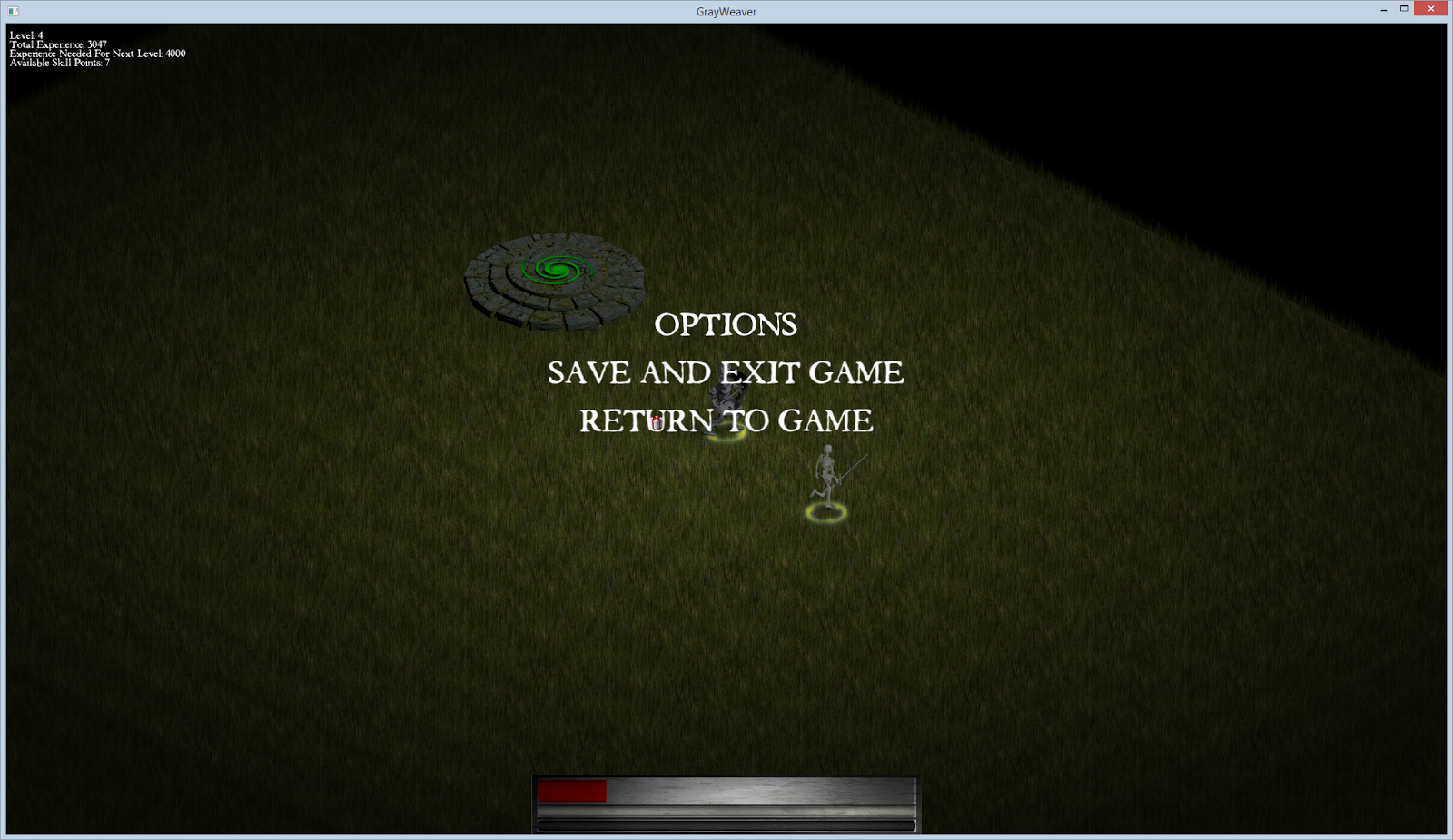
  • Basic Menu (work in progress)
    • Able to pull up a menu to save and exit the game; working on adding options such as changing resolution or hotkeys.
  • Building using CMake
    • This is internal, but previously I was using a custom script to quickly compile the game, however finally added support for CMake to automatically create Makefiles to build the game. This way is more robust but unfortunately the dependancy tracker is *really* slow when building on the older computer (for building and testing on the 32-bit computer from 2008, it takes a good 5 minutes to build versus 2 minutes on my newer desktop. The previous script to build took much less time since it didn't use a dependency tracker (it would rebuild whatever was changed, but you had to run -clean if headers were changed).
Killing several monsters has rewarded enough experience to reach level 4. (Click the image to read the stats in the top left corner). Additionally, the player's health and energy bars, and the targeted enemy health bar is visible.

As a quick recap of all the new features, the first is the addition of experience. Using Excel an algorithm for determining leveling was created. Two factors had to be addressed: as you level up, it becomes harder to level, and lower level creatures reward less experience that drops off at an exponential rate. As of now there is no plan for a level cap, but at around level 80 it starts to take a lot longer to level, and at level 99 it takes roughly 25,000 unit kills to level up. The idea is to create a "soft-cap" on leveling, so that while you are free to level as much as you want, it becomes incredibly difficult to do (to the point of not being practical for the reward it gives).

The inventory and equipped items shown. Next to the player can be seen a dropped item (filler sprite) and if you notice, the player is not wearing his armor (which, due to not having a default armor sprite yet, results in an "invisible" body).

A new interface has been created that shows both the player's health, energy, enemy health (if targeted), and the inventory/equipped items. The inventory supports equipping and unequipping items, along with picking up and dropping items. Due to my lack of painting skills, I resorted to developing the interfaces in Blender and using the 3D renders to develop the interface graphics.

If you look at the above picture, you can see a portal near the player. A new type of unit called "Portals" are now supported that allow a player to travel to different maps by clicking on it. When changing maps, a unit's minions automatically travel with it.

An important addition was made to the Unit class that allowed tracking of stats such as which type of units were killed, the unique ID of all monsters killed, and areas entered. This, along with a new quest system in the works, allows for players to complete tasks such as killing a unique boss or even something like the "Den of Evil" quest from Diablo 2, where you had to clear out an entire map of enemy units.

The main menu (accessed when pressing the Escape key).

The menu system is still very rudimentary, with only support for saving and exiting the game. Saving the game state posed an interesting problem because there are many ways to approach this problem. In games like Diablo 2, you simply save the player character's stats and progression and reload all the maps, etc from a clean slate. Since it's easy to do (at least for now), I decided to just save everything exactly as it is, so that when you save the game then load it later, it loads *exactly* as it was when you saved it, including the location of all enemies and their current state, along with your own minions. Saving the game utilized the Protocol Buffers library from Google, which allows you to define a special "Proto" file that defines the data structures you want to save to and serialize. You then compile this Proto file into a C++ file and header that can be included in your program. From there, you create a data structure (defined in the Proto file), store the relevant data to it, then serialize it. Later you simply load that serialized file into a ProtoBuf structure, and read the relevant data from it to reconstruct your game's entities.

CMake support added for building the game.

Previously, I used a simple Python script I wrote that compiled the game and detected changes to files to know which files to rebuild. While it worked great and was really fast to setup, I needed a more robust system since the project is starting to reach a point where features like a dependency tracker, that determines what to rebuild when a header file changes, are faster than just rebuilding the entire project. Also, it should be noted that you never want to re-invent the wheel if it can be helped. After following the excellent Cmake tutorial by written by John Lamp, I was able to setup Cmake and start using Make for my project. Sadly it has slowed down build times on the dinosaur I use for 32-bit testing, but it works none-the-less!

All these features are starting to add up to a good foundation for the game. There are still a lot of features and other additions left to be added before this game is worthy of something like a demo, but at least it's progressing!